Format large disks with FAT32
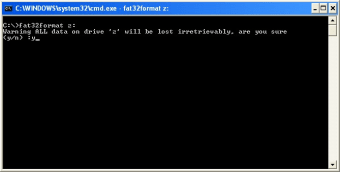
FAT32 is an exciting, free feature that is essentially intended to cut down on wasted cluster spaces. It was first introduced by Microsoft as part of its iconic Windows 95 operating system, specifically the OSR2 version of Windows 95. In more recent years, FAT32 file format is used to support memory cards ranging in size between 4GB and 32GB.
Top Recommended Alternative

File Allocation Table
FAT32 is derived from the File Allocation Table (FAT) system of filing that is used to support drives with storage in excess of 2GB. Due to the fact that FAT32 drives have capacity for 65,000 or more clusters, smaller sized clusters are utilized than in comparison with larger FAT16 drives. This efficiency results in more effective allocation of space on this drive. The largest possible file for this drive is 4GB minus 2 bytes. The system of filing comprises 4 bytes per cluster within the table for allocation of files. Notably the high 4-bit portions of the 32-bit values in the FAT32 file allocation table are allocated elsewhere and are not designated as comprising a portion of the number that is clustered.
FAT32 Features
Due to the fact that the Fat 32 BIOS Parameter Block (B.P.B.), depicted by the by the B.P.B. structure, is larger in size than a garden variety B.P.B, the boot record on FAT32 drives exceeds that of one sector. Additionally, there is a segment in the area reserved on FAT32 drives containing values for the counting of non-allocated clusters and the clustered numbering of the cluster that was most recently apportioned a location. These values are components of the "BIG FAT BOOT FSINFO" structure which is to be found within this segment. The supplementary fields permit the system to commence the values, excluding the need to read the FAT table in its entirety. It is usable with SD cards with SDHC and micro SDHC cards. On desktop and workstation PCs it still works on older Windows XP and 7 devices, as well as more recent iterations like Windows 8.1 and 10. On Apple devices it works on the Mac OS 8 and 9x onwards.
Some Last Words
The Fat32 interface is very easy to use and can be run as a separate, distinct program. It is very easy also to update the FAT 32, users can do so with relative ease by using the "version info" tab. It can function on a PC as a stand-alone program, users can also operate it on any PC with a basic thumb drive, thus eliminating the need to modify the existing system registry. If you are the type of computer user that could use a program like this, it's a proverbial "no-brainer"! So go and download Microsoft's enduring, free and versatile Fat32 today!